Add Prompts is where you choose what AI Rankia monitors for your brand.
The real page
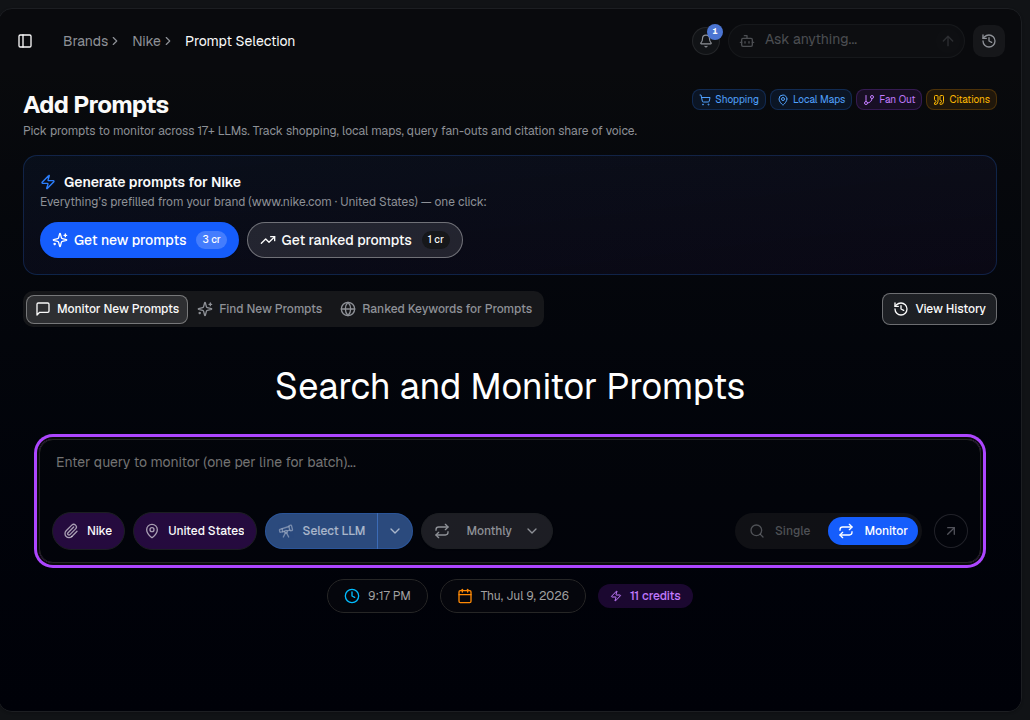
Steps
- Open AI Visibility ▸ Add Prompts.
- Enter the prompts you want to track — the real questions your customers ask AI engines. Not sure where to start? Use Get new prompts to auto-generate suggestions prefilled from your brand, or use AI Prompt Discovery.
- Choose Single for a one-off, instant check, or Monitor to track it on a recurring schedule (weekly or monthly).
- Choose the AI engines to run it against (ChatGPT, Gemini, Claude, Perplexity, Google AI, Grok, DeepSeek and more) via Select LLM.
- Confirm the brand and country chips are correct, then run it.
Other ways in
- Get new prompts — one click, auto-generates a fresh prompt set from your brand's domain and market.
- Get ranked prompts — pulls prompts already ranked for your space.
- Shopping / Local Maps / Fan Out / Citations shortcuts at the top — jump straight to those specialized prompt types.
Prompts you choose to Monitor start collecting results on schedule and appear under Tracked Prompts and on your Overview.
Tip: Each prompt run across multiple engines uses credits. Test with Single mode first, then switch your best prompts to Monitor.