AI Visibility Overview is your brand's home base in AI Rankia — the first thing to check when you want to know "how am I doing in AI search right now?"
A real result
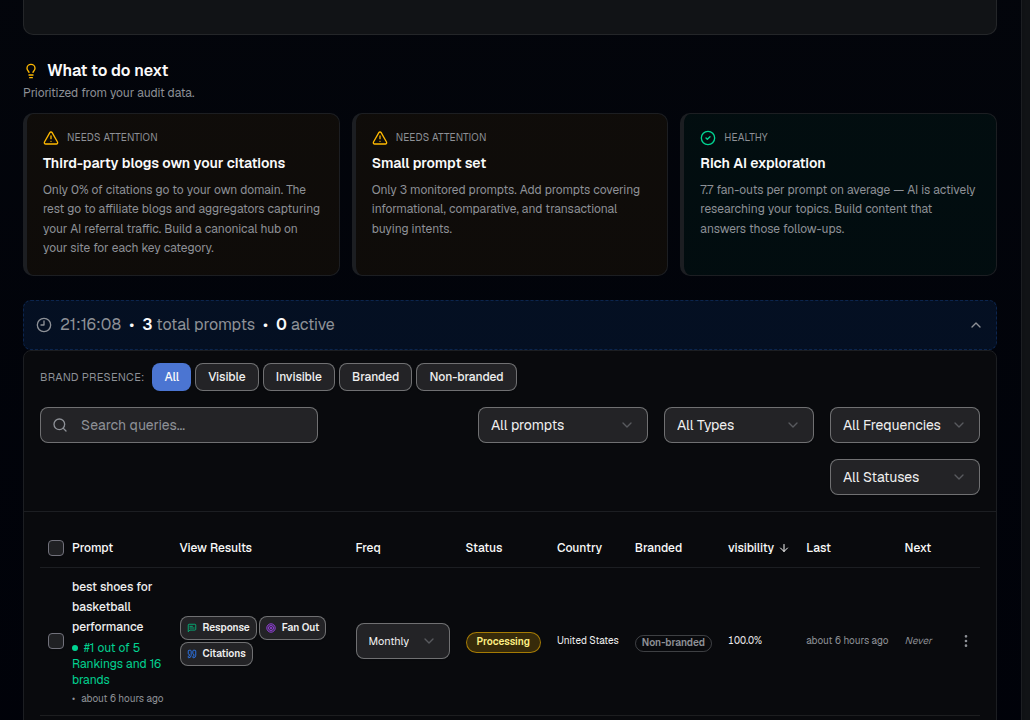
Once your prompts have run, Overview gives you prioritized insights and a per-prompt breakdown — here, Nike ranked #1 out of 5 brands for one tracked prompt, with 100% visibility for the period:
What you'll see
- Visibility, Reach, Mentions, Brand #1 — your headline numbers for the period, plus how many total brands and domains showed up across your prompts.
- What to do next — prioritized insights pulled straight from your data, for example flagging that third-party blogs are capturing your citations, or that your prompt set is too small.
- Brand presence filter — narrow the prompt table to Visible / Invisible / Branded / Non-branded queries.
- Per-prompt table — every tracked prompt with its ranking position, visibility %, run frequency, status and country, plus one-click links to that prompt's Response, Citations and Fan-Out.
- Engine breakdown — a filter to isolate any single AI engine (ChatGPT, Gemini, Claude, Perplexity, Google AI, Grok, DeepSeek and more).
How to use it
- Select the brand you want in the top-left switcher.
- Read the What to do next cards first — they're prioritized from your actual audit data.
- Scroll to the per-prompt table and sort by visibility to see your strongest and weakest tracked prompts.
- Click into any prompt's Response or Citations to read the full AI answer and the sources behind it.
- Decide where to act next — more prompts to track, new content, or outreach to the sources you saw cited.
New here? The Overview fills in once you've added prompts and run monitoring. Start with Add Prompts, then come back here.