Articles is the AI-assisted workspace where you draft, edit and refine content designed to be cited in AI answers — from a queue of ready-to-write ideas through to a full editor.
A real result
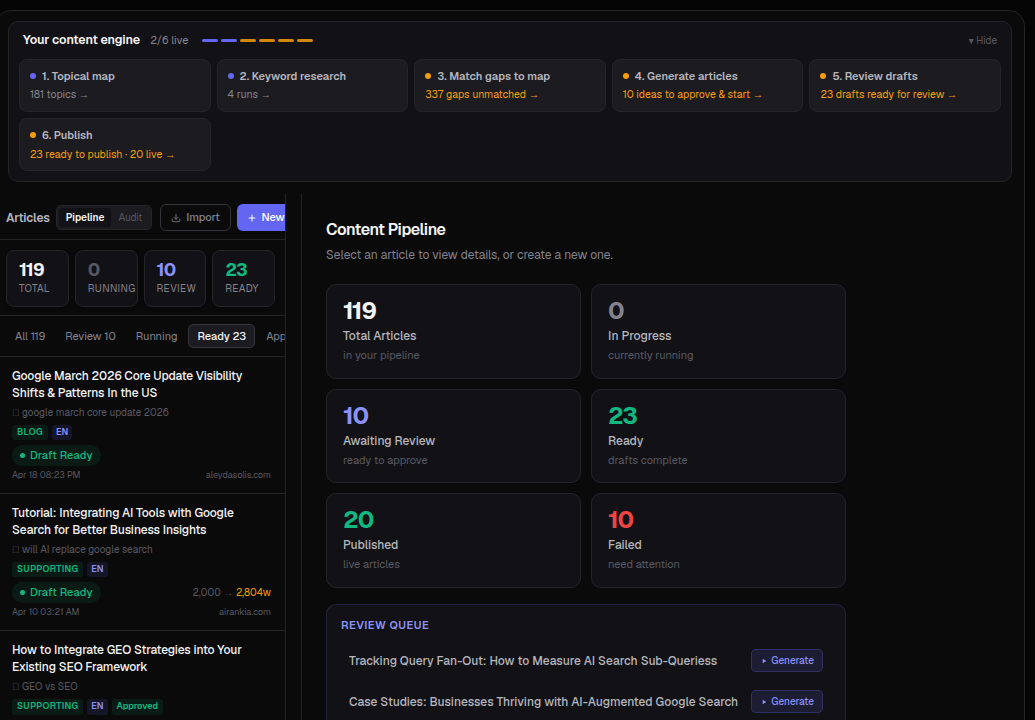
Your pipeline gives you a running count of every article by stage — total, in progress, awaiting review, ready to publish, published and failed — with a filterable list underneath.
What you'll see
- Total / In Progress / Awaiting Review / Ready / Published / Failed — the full state of your content pipeline at a glance.
- Article cards — title, target keyword, type (Pillar / Cluster / Supporting / Blog), language, status and word count, plus which site it's tied to.
- Content Pipeline panel — select any article to see its details, or start a new one.
- Review Queue — a shortlist of the next articles waiting for you to generate or approve.
The editor, once you open an article
- Focus / Preview / Editor / HTML — different ways to read or edit the same draft.
- Draft / QA / Outline / Semantic Score / Entity SEO / Pipeline / Keywords / Internal Links — tabs covering everything from a quality check to how well the draft covers its target entities.
- A Semantic Score with a plain-English label (e.g. "Weak · Far from top") so you know at a glance whether a draft is ready or needs another pass.
How to use it
- Open Content ▸ Articles.
- Click New to start from a topic, or approve one already queued in Review.
- Work through the pipeline stages — Draft → QA → ready to publish.
- Use the Semantic Score tab to check a draft's strength before publishing.
- Publish via WP or mark as published once it's live.
Tip: Feed articles from your Topical Map and Fan-out Gaps so everything you publish targets a real, measured gap instead of a guess.