Topical Map builds a map of the topics you should cover to become an authority in your niche — the clusters AI engines expect a credible source to own.
A real result
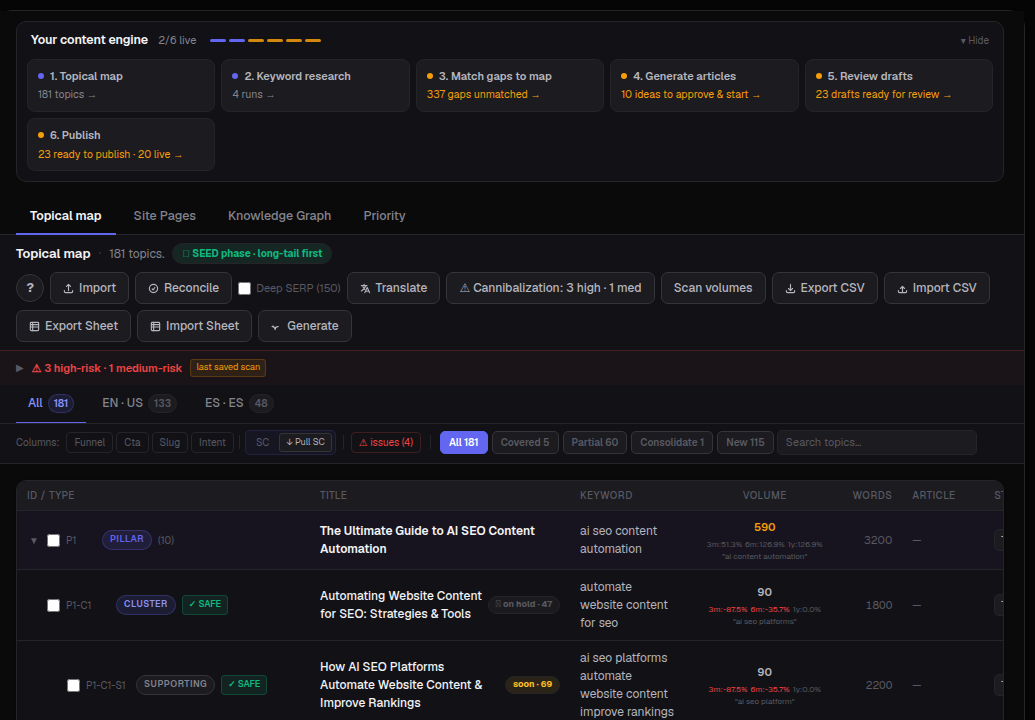
A live topical map shows every topic as a pillar-and-cluster hierarchy, each row scored by search volume, word count target and article status — plus live cannibalization warnings.
What you'll see
- Topics count & phase label — how many topics are mapped, and whether you're in an early "SEED phase" (long-tail first) or scaling up.
- Pillar / Cluster / Supporting rows — the hierarchy: one pillar page, several cluster pages under it, and supporting articles under each cluster.
- Volume, Words, Article status — per-topic search demand, target length, and whether it's written yet.
- Cannibalization warnings — high- and medium-risk overlaps where two topics compete for the same keyword.
- EN·US / ES·ES language split — coverage broken out per language you publish in.
- Reconcile, Translate, Scan volumes, Generate — tools to keep the map accurate and turn any row directly into a new article.
How to use it
- Open Content ▸ Topical Map.
- Generate a map from your brand or a seed topic if you're starting fresh.
- Review the pillar/cluster structure and check the cannibalization warning banner first — those cost you rankings today.
- Filter by Covered / Partial / Consolidate / New to see exactly what's missing.
- Select any row and click Generate to send it straight into Content ▸ Articles.
Tip: Full topical coverage is what earns AI's trust. Use the map to plan a complete program, not one-off posts — and revisit AI Visibility ▸ Semantic Map to see which of your gaps AI has already noticed.