The LLM Readiness Audit checks whether AI crawlers can actually access your site — because a page AI can't read is a page AI can never cite, no matter how good the content is.
A real result
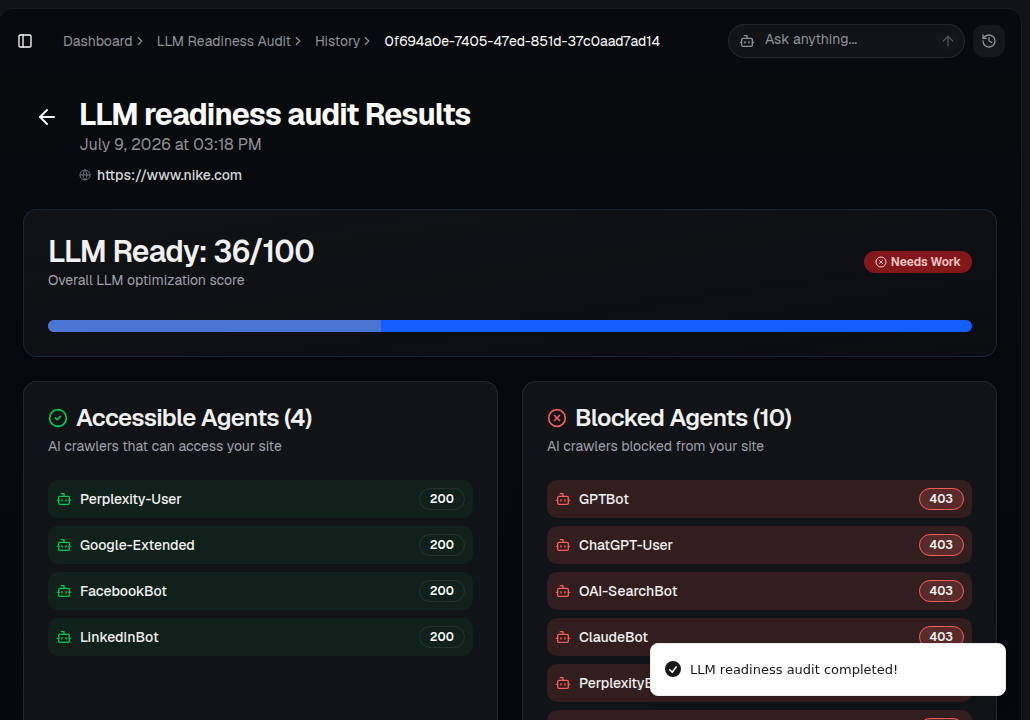
Here's what a completed audit looks like: an overall readiness score, plus a clear split of which AI crawlers are let in and which are blocked.
What you'll see
- LLM Ready score (0–100) — your overall optimization score, with a plain-English label like "Needs Work."
- Accessible Agents — the AI crawlers that CAN reach your site (for example Perplexity-User, Google-Extended).
- Blocked Agents — the AI crawlers currently blocked, each with the HTTP status they receive (a 403 means your server is actively refusing them). It's common — and often unintentional — to see major crawlers like GPTBot, ChatGPT-User or ClaudeBot blocked here.
- Further down the report: specific, prioritized fixes for each blocker found.
How to use it
- Open AI Visibility ▸ LLM Readiness Audit for your brand.
- Enter your website URL and run the analysis — it costs a small number of credits per run.
- Check the Blocked Agents list first. If a major AI crawler shows a 403, that's usually a robots.txt or firewall rule blocking it — an easy, high-impact fix.
- Work through the rest of the recommendations, then re-run the audit to confirm your score improved.
Tip: A blocked crawler is often the single biggest reason a well-written page never gets cited. Check this before investing more in content.