Page Intelligence shows how your individual pages perform across search and AI — and whether AI engines can actually see them. Every analytics feed lives on one page per URL: Search Console, Bing, GA4 AI traffic and Cloudflare bot crawls.
A real result
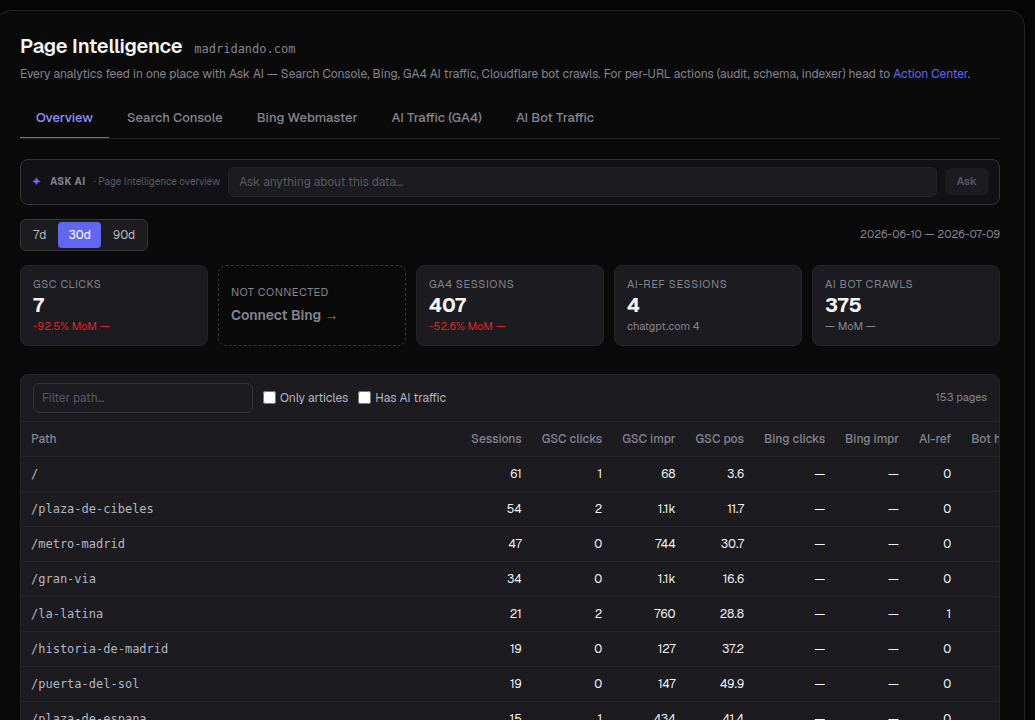
Here's what a fully connected site looks like: GSC clicks, GA4 sessions, AI-referral sessions (visits arriving from AI assistants) and AI bot crawl counts, plus a per-page breakdown table.
What you'll see
- GSC Clicks & GA4 Sessions — your standard search and site-traffic numbers, with month-over-month change.
- AI-ref sessions — visits arriving specifically from AI assistants (labeled by source, e.g. chatgpt.com).
- AI Bot Crawls — how often AI crawlers actually visited your pages, proof they can reach you.
- A per-page table (Path, Sessions, GSC clicks/impressions/position, Bing clicks/impressions, AI-ref, Bot hits) you can filter to articles only, or to pages with confirmed AI traffic.
- An Ask AI box to query the data directly in plain language.
How to use it
- Connect your sources under Analytics ▸ Integrations — Search Console, Bing Webmaster, GA4 and Cloudflare.
- Open Analytics ▸ Page Intelligence.
- Sort by AI-ref sessions or Bot crawls to find your strongest AI-visible pages, or filter to pages with zero AI traffic to find blind spots.
- Send weak pages to Content for a refresh, or flag crawl gaps for the LLM Readiness Audit.
Tip: A page with GSC traffic but zero AI bot crawls is worth investigating — it may be blocked or simply never discovered by AI crawlers yet.