Tracked Prompts is the library of every prompt you're monitoring, with its results and history over time.
A real result
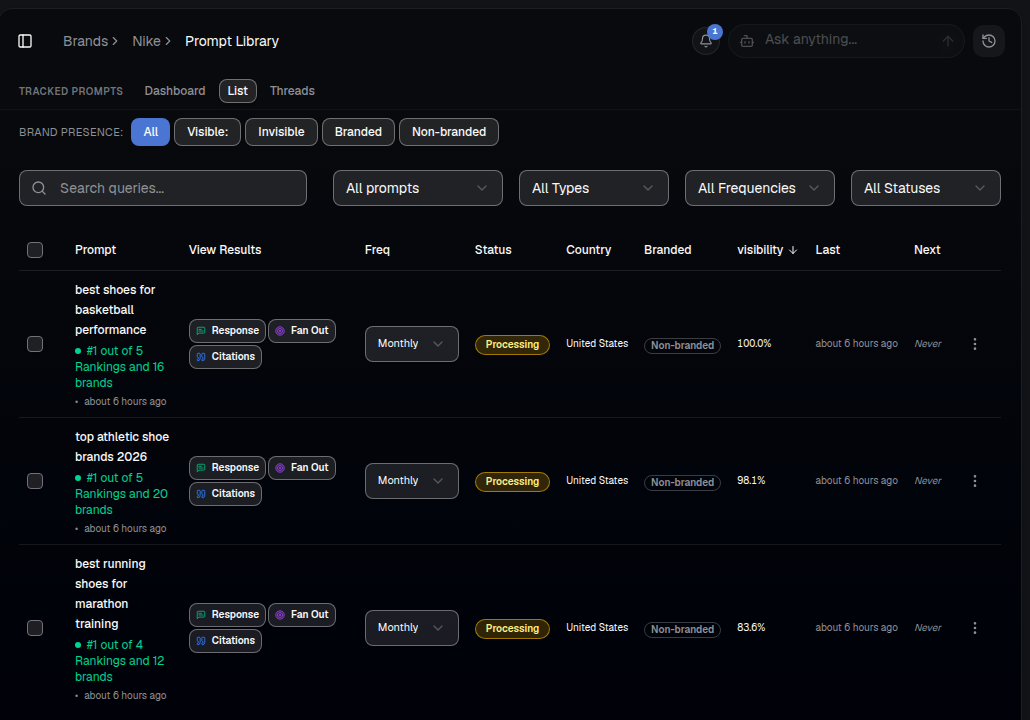
The List view shows every tracked prompt with its live ranking position, visibility score, schedule and status in one table:
What a prompt is
A prompt is a real question your audience asks an AI engine — like "best running shoes for marathon training" or "top athletic shoe brands 2026". AI Rankia runs each tracked prompt against the AI engines you choose and records whether, and how, your brand shows up.
What you'll see
- Dashboard / List / Threads — three ways to view the same tracked prompts: an analytics dashboard, a sortable list, or full answer threads.
- Rank & visibility — each prompt's current ranking position (e.g. "#1 out of 5 Rankings and 16 brands") and visibility percentage.
- Response / Citations / Fan Out — quick links straight into that prompt's full AI answer, its cited sources, and the sub-queries AI generated for it.
- Freq, Status, Country, Branded — the monitoring schedule, whether it's actively processing, target market, and whether the query names your brand directly.
How to use it
- Open AI Visibility ▸ Tracked Prompts.
- Use List view to scan every prompt's rank and visibility at once, or Dashboard to filter and chart a specific prompt over time.
- Click Response to read the exact AI answer, or Citations to see the sources behind it.
- Watch how each prompt's result changes over days and weeks as monitoring keeps running.
Adding more
Add prompts from AI Visibility ▸ Add Prompts, or discover new ones with AI Prompt Discovery.
Tip: Monitoring uses credits each time a prompt runs across engines. Track the prompts that matter most and use weekly monitoring for the long tail.