Domain Overview gives you a fast, complete read on any website's search footprint — yours or a competitor's.
A real result
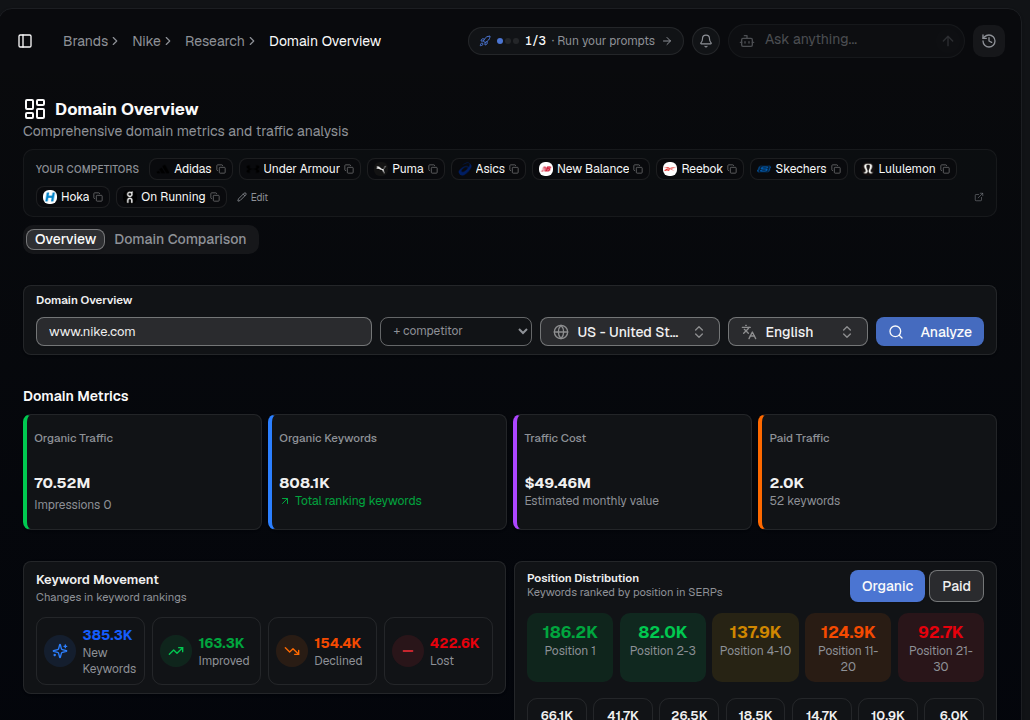
One search returns the full picture: organic traffic, ranking keywords, estimated traffic value, paid traffic, keyword movement and exactly how many keywords sit in each SERP position band.
What you'll see
- Organic Traffic & Organic Keywords — the scale of a domain's search visibility.
- Traffic Cost — the estimated monthly value of that traffic if you had to buy it as ads.
- Paid Traffic — how much of their visibility comes from ads instead of organic.
- Keyword Movement — new, improved, declined and lost keywords, so you can see momentum, not just a snapshot.
- Position Distribution — how many keywords rank #1, #2-3, #4-10, #11-20 and #21-30, for organic or paid.
How to use it
- Open SEO ▸ Domain Overview for your brand — your detected competitors are pre-loaded as quick-add chips.
- Enter your domain to benchmark yourself, or a competitor's to study them, and click Analyze.
- Note their strongest pages and keywords, and whether they're gaining or losing ground.
- Switch to Domain Comparison to put two domains side by side.
- Use what you learn to prioritize content and outreach.
Tip: Run your top competitors through Domain Overview to quickly find the pages and topics earning them the most visibility, then check whether those same topics show up in your Semantic Map gaps.