Link Building helps you find the backlink opportunities that strengthen your authority — the kind that helps you rank and get cited.
A real result
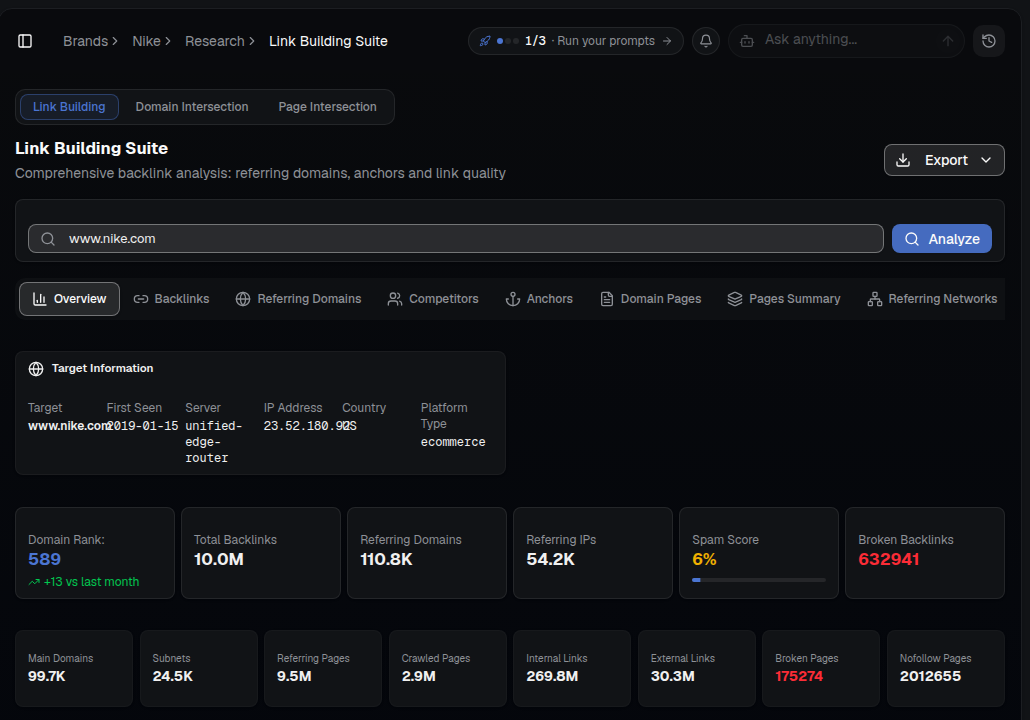
One lookup returns a full authority and backlink profile: domain rank, total backlinks, referring domains and IPs, spam score, and a breakdown of crawled, internal, external and broken pages.
What you'll see
- Target Information — first seen date, server, IP address, country and platform type for the domain.
- Domain Rank & Total Backlinks — the headline authority numbers, with month-over-month movement.
- Referring Domains / Referring IPs — how diversified their backlink profile is.
- Spam Score — a quality signal; the lower, the healthier the link profile.
- Backlinks / Referring Domains / Competitors / Anchors / Domain Pages / Pages Summary / Referring Networks tabs — drill into any dimension of the same profile.
How to use it
- Open SEO ▸ Link Building for your brand.
- Enter your domain (or a competitor's) and click Analyze.
- Review the Overview for authority and spam signals.
- Switch to Competitors or Referring Domains to find realistic link targets, or Domain Intersection / Page Intersection to find sites that link to competitors but not you.
- Prioritize the most relevant, high-authority targets and pursue them — or find AI-citation-specific opportunities in Links and PR.
Tip: Links from sources AI already trusts do double duty: better rankings and more AI citations. Cross-reference targets with AI Visibility ▸ Source Influence.