Competitors helps you see who you're really up against in search — and where they're beating you.
A real result
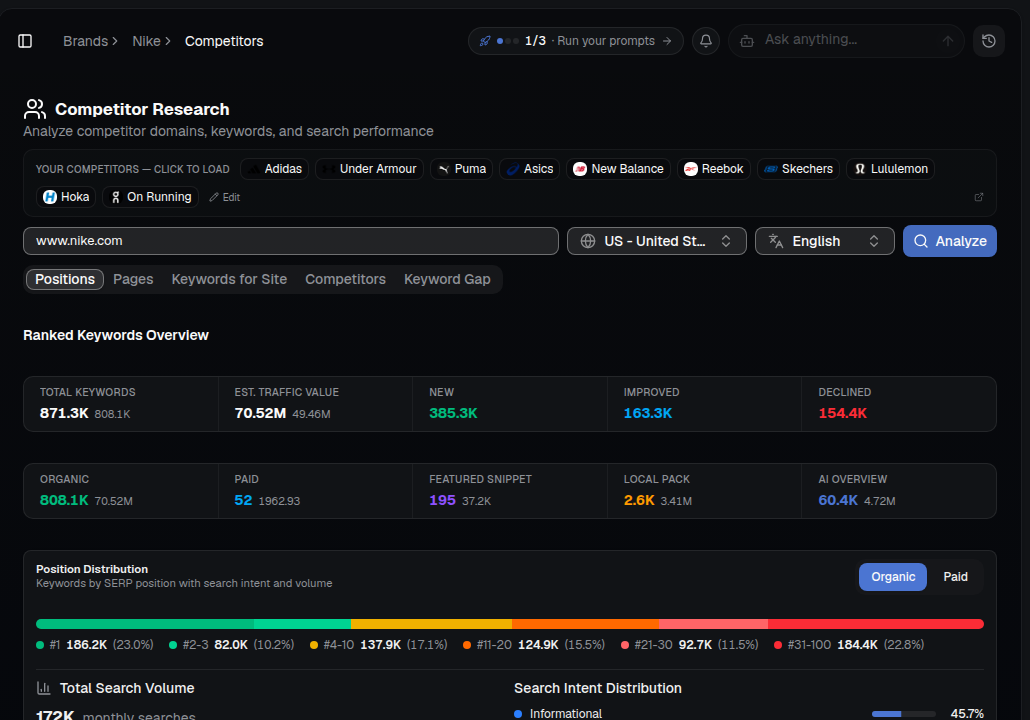
Once you analyze a domain, you get a full ranked-keyword breakdown: total keywords, traffic value, new/improved/declined movement, and how those keywords split across organic, paid, featured snippets, local pack and AI Overviews.
What you'll see
- Total keywords & traffic value — the full size of a domain's organic footprint.
- New / Improved / Declined — how their rankings are moving right now.
- Organic vs. Paid vs. Featured Snippet vs. Local Pack vs. AI Overview — where their visibility actually comes from.
- Position distribution — how many keywords they hold at #1, #2-3, #4-10, and beyond.
- Positions / Pages / Keywords for Site / Competitors / Keyword Gap tabs — different cuts of the same competitive data.
How to use it
- Open SEO ▸ Competitors for your brand — your detected competitors are pre-loaded as chips at the top.
- Enter your domain (or a competitor's) and click Analyze.
- Review the ranked-keyword overview and position distribution.
- Switch to the Keyword Gap tab to see exactly which keywords a competitor ranks for that you don't.
- Feed those gaps into Content and your prompt tracking in AI Visibility.
Tip: Your AI-search rivals and your SEO rivals often overlap. Compare with AI Visibility ▸ Source Influence to see who dominates both.